
Split Pay: Split Bills in Two
Split PayFinance
4.9476.00 Reviews
- Version
- 2.0.4
- Installs
- 100.00K
- Age Rating
- Everyone
Screenshots
Our Review of Split Pay: Split Bills in Two
 Analysis by Appyee
I approached Split Pay: Split Bills in Two as a finance app for one very specific problem: making a large recurring payment easier to handle by dividing it into two parts. That focus is more interesting than it may sound. Rent, a mortgage payment, or a car payment can arrive at an awkward point in the month, especially when income and other bills do not line up neatly. Instead of treating every expense as one large event, Split Pay is built around changing the timing of that burden.
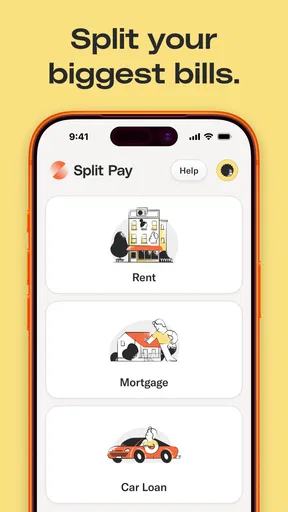
My first impression is that this is not trying to replace a full budgeting suite, a bank account, or a traditional bill-management dashboard. Its identity is much narrower. The developer, Split Pay, has made a free finance app whose store summary centers on rent, mortgage, and car payments. That makes the app easier to understand than tools that try to track every spending category at once, but it also means the value depends heavily on whether splitting those particular payments matches the way you manage money.
The app has a 4.9 average from around 3.3 thousand ratings, and it has passed 100 thousand installs. Those figures suggest that the central idea is resonating with a meaningful group of users. Still, I would not read that as proof that it fits every household. A payment-splitting service can be genuinely useful for one cash-flow pattern and unnecessary for another, so the important question is not simply whether the app is popular. It is whether dividing one major obligation into two moments gives you better control.
What splitting one major payment changes
I find that dividing one major payment can change more than the date money leaves your hands: it gives me two chances to check what the rest of the month can support. I’d use those moments to look ahead at essentials and protect each contribution before treating the remaining balance as available. That planning rhythm matters most when the household has to coordinate who sets aside each part.
The useful capability is timing, not simply arithmetic
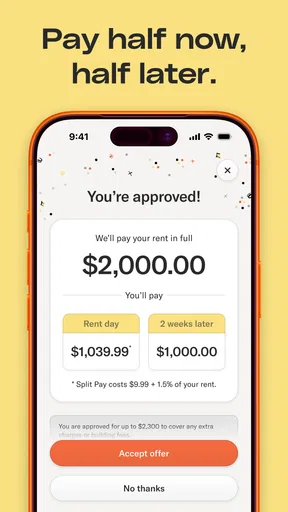
The key capability is easy to describe: Split Pay lets you approach a rent, mortgage, or car payment as two smaller contributions rather than one single amount. The practical effect is not that the bill becomes cheaper. The total obligation still matters. What changes is the way the payment fits into the month.
That distinction is important because many budgeting problems are timing problems rather than income problems. Someone may have enough money overall but feel squeezed when a large payment lands immediately after other automatic charges. Dividing the commitment can create a more even rhythm. I find that more useful than a feature that merely displays a balance, because it changes the point at which money needs to be ready.
For example, imagine a renter who receives income at two different points in the month. With a conventional setup, the full rent may be mentally tied to one payday, even if the second payday arrives soon afterward. A split arrangement can make the expense correspond more closely to those two income moments. That does not remove the need to plan, but it can reduce the uncomfortable gap between receiving money and watching a large amount leave at once.
The same logic can apply to a vehicle payment or mortgage commitment, although the consequences of getting the timing wrong are more serious with secured or credit-related obligations. I would treat the app as a cash-flow tool, not as permission to spend money that is not available. The split helps organize a payment; it does not reduce the amount owed.
Why this is different from an ordinary budgeting app
Most general budgeting apps begin with categories, account balances, spending history, or goals. They are useful when you want a broad picture of where money goes. Split Pay starts from a single large obligation and asks how that obligation can be handled more comfortably. That is a narrower approach, but the narrowness is part of its appeal.
If your main concern is knowing how much you spend on dining, subscriptions, transport, and shopping, this is unlikely to be the best primary tool. A conventional budget can show patterns across an entire month and may offer more context for discretionary spending. Split Pay is better suited to the person who already understands their broad budget and wants a more manageable method for one unavoidable payment.
I also see a psychological benefit. A large bill can dominate the month even when it is planned. Thinking in two contributions may make the obligation feel less like a single financial cliff. That is not a substitute for accurate numbers, but it can make a routine payment easier to incorporate into a weekly money check.
How I would use it around a real payday cycle
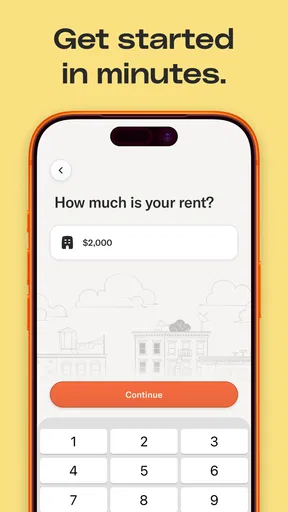
I would begin by writing down the full payment amount and the dates on which money normally becomes available. Then I would decide whether two contributions genuinely match that cycle. The best arrangement is not automatically an equal division. What matters is whether each part can be covered without relying on a future deposit that might arrive late.
In a realistic household, the first part might be set aside after the earlier income arrives, while the second part is prepared after the later income arrives. That workflow can be easier to follow than leaving the entire amount untouched in one account and hoping it remains available. It also creates two natural checkpoints: one to confirm that the first contribution is ready and another to verify that the second will not collide with other obligations.
One non-obvious advantage is that the split can expose weak points in a budget. If the first portion is comfortable but the second repeatedly causes strain, the issue is not solved by dividing the bill evenly. The pattern tells you which part of the month is overloaded. I would use that information to adjust discretionary spending, move other due dates where possible, or build a small buffer rather than assuming the app alone has fixed the problem.
A practical household example
Consider two people sharing a home, with one person paid near the beginning of the month and the other paid around the middle. They may already agree on the total housing cost, but a single payment date can force one person to carry the whole amount temporarily. Splitting the payment can make their contributions feel more connected to the timing of their income.
That arrangement can also make conversations clearer. Instead of saying, “We need to find the rent,” they can discuss whether the first portion is ready, whether the second portion is reserved, and which other expenses fall between those checkpoints. In my view, this is where the app’s concept has the most everyday value: it turns a vague end-of-month worry into two specific planning moments.
There is a trade-off, though. More checkpoints mean more opportunities to lose track. If both people assume the other has handled the next portion, the split can create confusion instead of reducing it. I would therefore agree in advance on who is responsible for each contribution and keep the arrangement visible in whatever shared money system the household already uses.
The best scenario for Split Pay
The strongest use case is someone with predictable income arriving in two regular waves and one large fixed payment that creates pressure when handled all at once. A renter paid biweekly, a couple with staggered paydays, or a driver managing a substantial car payment may recognize the problem immediately. For these users, the app’s focused design can be more useful than a broad financial dashboard filled with unrelated tools.
It is especially appealing when the person already knows the payment is affordable in total. The question is simply how to reserve the money without making the rest of the month feel empty. In that situation, splitting can support discipline because each contribution has a clear purpose and a defined place in the rhythm of the month.
I would be more cautious if income is irregular. Freelancers, seasonal workers, and anyone whose deposits change substantially may find that two fixed contributions create false confidence. A split schedule can look tidy on paper while remaining difficult in practice. For those users, a flexible sinking fund or a larger emergency buffer may be more appropriate than a rigid two-part plan.
Where the experience may require extra care
The biggest limitation is conceptual: dividing a payment does not change the rules imposed by the landlord, lender, or service provider. The app’s role is connected to the way you organize the payment, but the recipient may still expect the full amount by a particular deadline. Before depending on the split, I would make sure I understand how the arrangement is handled and whether the final payment timing matches the obligation.
This is also why I would not use the app casually for a payment that has severe consequences for lateness. A mortgage or car payment can affect more than a monthly comfort level. The convenience of two contributions is valuable only when the complete amount is reliably ready when required. If there is any uncertainty in your income, I would prioritize a buffer and a clear due-date plan.
Another point of friction is that a focused app may not answer broader questions. It can help me think about one major payment, but it is not the same as reviewing debt, savings, variable spending, and upcoming annual expenses together. I would pair it with a simple monthly budget rather than expecting it to provide a complete financial picture.
What the app’s presentation tells me about its audience
Split Pay is free, carries an Everyone content rating, and was released on December 5, 2023. Its current version is 2.0.4 and it requires operating system version 10 or later. Those details make it approachable for a broad audience, particularly someone looking for a straightforward finance utility rather than a complicated professional platform.
The free price lowers the barrier to trying the idea, which matters here because the benefit is personal and situational. I would want to test whether splitting actually improves my monthly routine before making it part of my financial habits. At the same time, free access should not encourage careless experimentation with a critical payment. I would begin with careful notes, verify the full amount, and watch one complete cycle before treating the workflow as dependable.
The Everyone rating also fits the basic concept: the app is aimed at ordinary payment planning rather than a niche professional audience. Still, accessibility does not remove the need for financial judgment. A simple interface can make a process easier to follow, but it cannot decide whether a split is affordable or whether a payment recipient accepts the timing.
Three ways to get more value from the idea
First, I would choose the split based on cash-flow pressure rather than automatically dividing the amount into identical halves. If one payday is smaller, an uneven contribution may reflect reality better, provided the full payment remains ready by its deadline. The useful question is, “What arrangement prevents a shortfall?” rather than, “What looks symmetrical?”
Second, I would treat the two parts as reserved money immediately after they become available. The danger with any split system is that a smaller visible amount can feel spendable. I would mentally label each contribution as already committed, even if it is still sitting alongside everyday funds. This is a small behavioral rule, but it protects the central purpose of the app.
Third, I would use the two checkpoints to review the rest of the month. At the first checkpoint, I would look ahead to subscriptions, utilities, groceries, and transport costs before spending freely. At the second, I would confirm that the final portion is protected. This turns the split into a recurring planning routine instead of a one-time calculation.
Who should choose a different approach
I would skip Split Pay as a main financial tool if my biggest need were detailed expense analysis, investment tracking, debt payoff planning, or a complete household ledger. A conventional budgeting app or a well-maintained spreadsheet would likely offer better visibility for those tasks. The focused design is helpful only when the large-payment problem is the problem I actually need to solve.
I would also hesitate if my income arrives unpredictably, if I often miss due dates, or if I do not have enough money to cover the full obligation. In those cases, splitting may make the schedule look more manageable without addressing the underlying shortage. A conversation with the payment provider, a revised budget, or an emergency reserve would be more important.
On the other hand, I think the app is a strong candidate for someone who repeatedly feels financially comfortable after receiving income but stretched when one major bill arrives. That person does not necessarily need more charts. They may need a better arrangement for setting aside money, and that is exactly where this app’s central capability can earn its place.
My overall recommendation
After looking at Split Pay through the lens of its main capability, I see a useful specialist rather than an all-purpose money manager. Its strength is the simple shift from one intimidating payment moment to two deliberate contributions. For the right cash-flow pattern, that can make rent, a mortgage, or a car payment easier to plan and less disruptive to everyday spending.
I would recommend trying it if you have predictable income, one prominent fixed payment, and a clear understanding that the total amount still has to be covered. I would not recommend relying on it without checking the recipient’s payment expectations or without maintaining a buffer for surprises. The app works best when it supports a sound plan, not when it is asked to rescue an unsustainable one.
With its free access, broad age rating, and focused purpose, Split Pay: Split Bills in Two is easy to consider for a specific budgeting problem. My honest view is that its value comes from discipline around the feature, not from the feature alone. If two well-timed contributions fit your income cycle, it can turn a recurring source of stress into a clearer routine. If your finances need broader visibility or more flexibility, a traditional budgeting method will probably serve you better.
Verdict
Strengths of Split Pay: Split Bills in Two
- Splits bills quickly without requiring complicated setup.
- Supports fairer payments when people order different items.
- Clean interface makes shared expenses easy to review.
- Useful for dinners, trips, roommates, and casual group spending.
- Helps reduce awkward payment calculations among friends.
Limitations of Split Pay: Split Bills in Two
- All participants may need the app for the smoothest experience.
- Payment features can vary by country or supported provider.
- Manual corrections may be needed when receipts are unclear.
- Not ideal for highly complex group budgets or recurring expenses.
- Privacy-conscious users may hesitate to share bill details.
Similar Picks in This Category
View All
Google Wallet
Google LLC4.3

Airtel: Recharge, Bank & Loans
Airtel4.0

PayPal - Pay, Send, Save
PayPal Mobile4.2

DANA Indonesia Digital Wallet
PT Espay Debit Indonesia Koe4.5

Binance: Buy Bitcoin & Crypto
Binance Inc.4.8

Cash App
Block, Inc.4.7
Frequently Asked Questions
What is Split Pay: Split Bills in Two, and how does it work?
Split Pay: Split Bills in Two is designed to make shared payments easier by dividing a bill between two people. After entering the total amount, users can calculate each person’s share and, depending on the available options, account for tips or other adjustments. Its straightforward layout is particularly useful after meals, shopping trips, travel expenses, or any situation where two people need to settle a payment quickly.
Can I use Split Pay for restaurant bills with tips and extra charges?
Yes, the app is suitable for restaurant checks and similar expenses where the final amount may include a tip or additional charges. You should enter the complete bill total or use the relevant calculation options provided in the app, then verify that the result matches your receipt. Since splitting rules can vary, always double-check taxes, service fees, discounts, and rounding before sending a payment request.
Does Split Pay: Split Bills in Two require an internet connection?
For basic bill-splitting calculations, an internet connection may not be necessary because the main function can generally be performed directly on the device. However, internet access could still be required for downloading the app, receiving updates, viewing advertisements, or using any sharing or payment-related features connected to external services. Availability may also differ between the Android and iOS versions.
Is Split Pay: Split Bills in Two free to download and use?
The app may be available as a free download, but users should review its store listing carefully because free apps can include advertising, optional purchases, or premium features. Pricing and included tools may change over time. Before installing, check the current Google Play or App Store description, supported devices, subscription details, and whether advanced sharing or customization options require payment.
Is Split Pay safe for handling my financial information?
Split Pay is primarily intended for calculating and organizing shared expenses rather than acting as a bank or payment provider. Even so, you should avoid entering sensitive information such as card numbers, banking credentials, or private account details unless the app clearly requires them and explains how they are protected. Review the developer’s privacy policy and requested permissions, and use official store download links.
